API Certification - How to Get Your Production API Keys
Last updated: April 3, 2026
How do I get API keys for production?
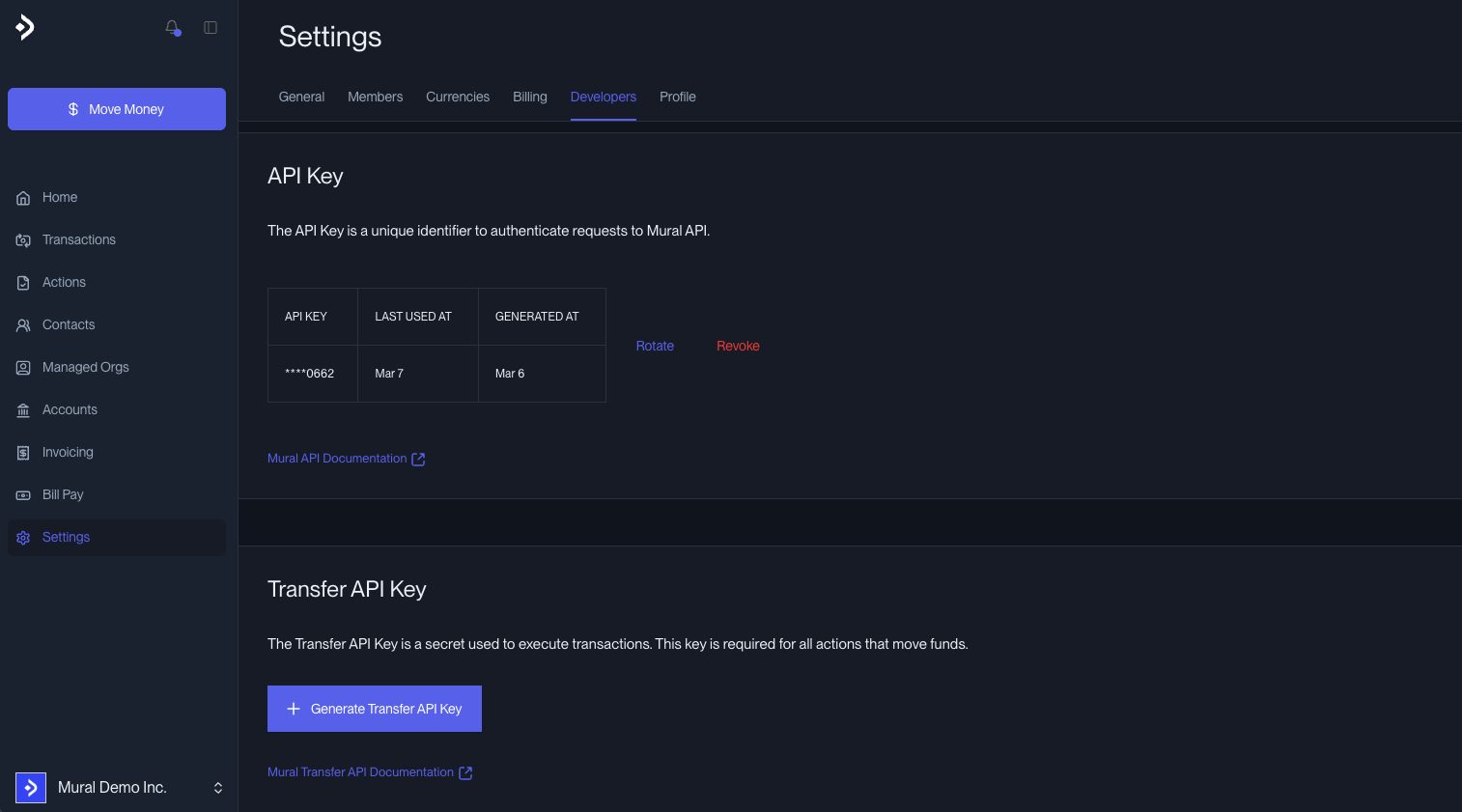
To get access to production API keys on Mural Pay, you first need to complete the Production API Certification. This is a required step before we enable production access for any API client.
The certification exists to make sure your integration is built correctly, handles errors properly, and is ready to move real funds safely. It's not a long process — it's a structured checklist you complete in the Sandbox environment, and once done, a Mural engineer reviews it with you in a short go-live call.
The process looks like this:
You integrate and test your full flow in the Sandbox environment
You complete the certification checklist (detailed below)
You reach out to your Mural contact to schedule the go-live review
Mural enables production API keys for your organization
Sandbox Access
Before you can complete the certification, you need access to the Sandbox. If you don't have it yet, contact your Mural representative and they'll get you set up.
Sandbox API Base URL:
https://api-staging.muralpay.comSandbox App: my.muralcloud.dev
API Documentation: developers.muralpay.com
The Sandbox behaves like production but uses test funds — no real money moves. All KYB/KYC is approved automatically within a few minutes, and your test account will be funded with USDC to run transactions.
Getting Sandbox API Keys
In your Sandbox environment, go to Settings > Developers to generate your two keys:
1. API Key — authenticates all requests via Bearer Authentication
2. Transfer API Key — required for executing/cancelling transactions and creating Accounts (sent via
transfer-api-keyheader)
Certification Checklist
Complete all sections that apply to your integration. Not every section is required for every client — focus on the flows you'll actually use in production.
Here's a checklist to help you track your progress through the certification:
Click the link 📥 Download the Certification Checklist, hit "Make a copy", and share it with your Mural POC so we can follow your progress along the way.
Setup & Authentication
Generated an API Key in the Sandbox — Settings > Developers
(Optional) Configured an IP allowlist for your infrastructure
Registered at least one webhook endpoint —
POST /api/webhooksSent a test webhook and confirmed receipt —
POST /api/webhooks/{id}/send
Organizations
This section applies if you are creating and managing organizations on behalf of your end users (multi-org / embedded finance use cases).
Created a managed organization —
POST /api/organizationsRetrieved the Terms of Service link and presented it to the end user —
GET /api/organizations/{id}/tos-linkConfirmed
tosStatuschanges toACCEPTEDRetrieved the KYC link and embedded it in your product —
GET /api/organizations/{id}/kyc-linkConfirmed KYC status changes to
APPROVED(End-User Custodial only) Integrated
@muralpay/browser-sdkand completed the challenge flow
Accounts
Created an Account —
POST /api/accountsRetrieved the Account and verified status is
ACTIVE—GET /api/accounts/{id}Verified that
payinMethodsare present and correct on the AccountFunded the Sandbox Account and confirmed the balance updated correctly
Payouts
Created a Payout Request for each fiat rail you plan to use —
POST /api/payouts/payoutExecuted a Payout Request —
POST /api/payouts/payout/{id}/executeRetrieved a Payout Request and verified status progression —
GET /api/payouts/payout/{id}Cancelled a Payout Request —
POST /api/payouts/payout/{id}/cancelCalled Get Fees and displayed the fee breakdown to your users —
POST /api/payouts/fees/fiat-to-tokenRetrieved bank details for the rail codes you'll use —
GET /api/payouts/bank-detailsTested a multi-payout (batch) request
(If applicable) Tested the
supportingDetailsflow
Payins
Created a Payin and received payment instructions —
POST /api/payins/payinRetrieved a Payin and verified status progression —
GET /api/payins/payin/{id}Retrieved exchange rates —
POST /api/payins/exchange-rate
Counterparties
Created a counterparty —
POST /api/counterpartiesRetrieved and updated a counterparty
Used a saved counterparty in a Payout Request
Webhooks
Webhooks are critical for a production-ready integration. Your system should never rely solely on polling.
Registered webhooks for all event categories you plan to use (no duplicate subscriptions)
Receives and parses
MURAL_ACCOUNT_BALANCE_ACTIVITYeventsReceives and parses
PAYOUT_REQUESTeventsReceives and parses
BUSINESS_VERIFICATION_STATUSevents (if applicable)Receives and parses
ORGANIZATION_TOSevents (if applicable)Always responds with
2xxto webhook deliveriesHandles duplicate webhook deliveries idempotently using
eventId/deliveryId
General Best Practices
These apply to every integration regardless of which features you use.
Handles API error responses gracefully — no silent error swallowing
Handles idempotency correctly — submitting a duplicate
externalIdreturns the existing resource, not an error or duplicate transactionUses pagination on all list/search endpoints (
nextId+limit)All API calls originate from your backend servers, never from the browser or client-side code
Ready to go live?
Once you've completed the applicable items above, reach out to your Mural contact or Mural Support ([email protected] / @Mural Support in slack) to schedule the go-live review call. We'll walk through the integration together, answer any questions, and enable your production API keys.
📩 Don't have a Mural contact yet? Write to us at support and we'll connect you with the right person.